Three ways to start
- Open the app. It starts recording as soon as it opens. If you left it less than two minutes ago and come back, it waits for your tap instead.
- Watch face complication. Put Start Recording on your watch face or in the smart stack; one tap opens the app and starts recording. The Control Center button does the same.
- Siri. Say “Record with Murmo Notes” or “Start recording with Murmo Notes”. It also appears in Shortcuts.
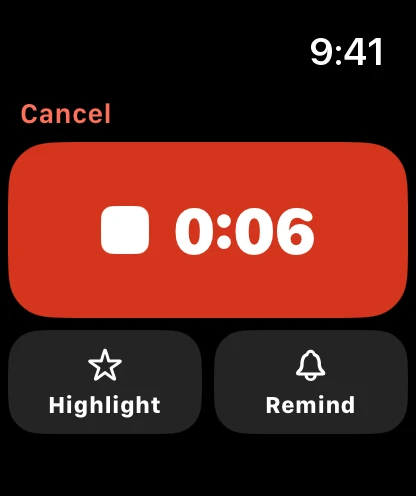
While recording, the red block in the middle stops it. Highlight and Remind sit underneath, for the moment that matters: Highlight marks that part, Remind turns it into a reminder.
Phone in another room?
Keep recording. The watch holds on to each recording until your iPhone confirms it arrived, and tries again every couple of minutes. The text appears once your iPhone has received it.
Forgot to stop?
- Wrist lowered for 30 seconds: the watch buzzes twice and shows “Stopping soon”; if you have not raised your wrist 10 seconds later, it stops.
- Nobody speaking for 2 minutes in a row, wrist up or down: it buzzes twice and shows “Stopping soon”; speak and it carries on.
- Screen off for 2 minutes in a row: it buzzes before it stops, in the same way.
What was said before it stops is saved and transcribed as usual. In a noisy place, or with someone nearby still talking, the watch cannot tell the difference, so tap stop yourself.
What you need
- An Apple Watch that runs watchOS 26: Series 6 or later, SE (2nd generation) or later, or Ultra (Apple’s compatibility list).
- An iPhone with iOS 26 or later. The watch app belongs to the iPhone app: install Murmo Notes on the paired iPhone first. Transcription happens there.
Where your recordings go
Recordings go from the watch to your iPhone, and are transcribed on the iPhone itself. The app has no server of ours to upload to. More detail is in the privacy policy.